Best Controller With Back Buttons for Switch, PC and Deck
By Clara Nguyen • 12th Nov
At a glance
The GuliKit KK3 MAX is the strongest fit here for players who want four detachable rear paddles across Switch, Windows PC, and Steam Deck—but it is not proven to be the overall best controller.
- Best overall fit: Choose it for four rear inputs, Switch extras such as gyro and NFC/Amiibo support, and analogue/digital trigger switching in one multi-platform controller. View on Amazon
- Best use case: It suits players who want to keep a thumb on the right stick while using face-button actions. It is a poor fit if you need full remapping or macro-capable back buttons.
- What decides it: Confirm how the listed features work on your specific platform, and update firmware before testing Hyperlink wireless on PC; one reviewer needed that step.
Important: No comparative testing, independent latency measurements, controlled battery testing, or current price evidence supports a universal ranking.
Finding the best controller with back buttons is harder when you play across a Switch, Windows PC, and Steam Deck: a feature that matters on one platform can be irrelevant (or unavailable) on another. If you want one multi-platform controller with rear buttons, the GuliKit KK3 MAX is a strong feature-fit candidate, not an automatic best-for-everyone pick. Its appeal is straightforward: four removable paddles, claimed Windows-only 1000Hz support, and Switch-focused extras in one controller. The catch is equally important: the rear controls are limited to face-button mapping, and there is no verified cross-platform performance testing or current price data to settle its value equation.
Short verdict: Choose the KK3 MAX if keeping your thumbs on the sticks matters more than advanced macro control, and you are prepared to check firmware before judging wireless PC setup.
1. GuliKit KK3 MAX: Best Fit for Four Back Buttons Across Switch, PC, and Deck
The GuliKit KK3 MAX is the one to consider when your shopping list starts with a controller with four back buttons, Switch support, and the option to use the same pad on a Steam Deck or Windows machine. The retailer lists compatibility with Switch, Switch OLED, Switch Lite, Steam Deck, Windows, macOS, Android, and iOS. That is broad on paper, though it should not be mistaken for proof that every feature behaves the same way on every device.
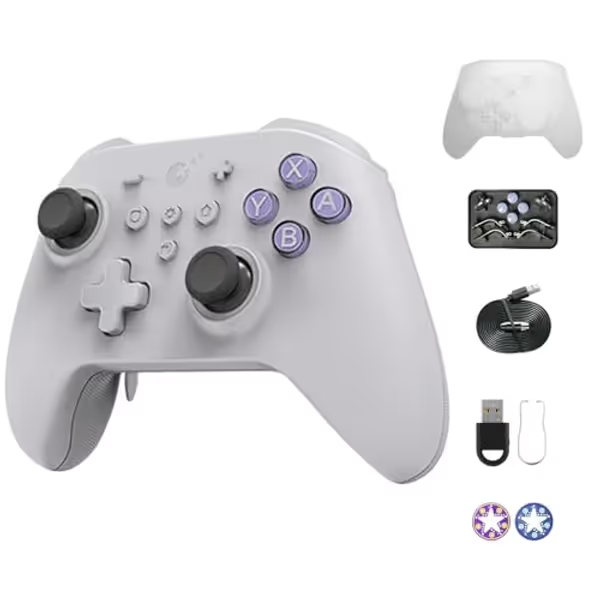
AKNES Gulikit KK3 MAX Controller
Versatile multi-platform controller with Hall effect sticks for precision gaming.
Polling Rate1000Hz (PC-Windows)
Polling Rate1000Hz (PC-Windows)
Pros
Drift-free Hall effect joysticks & triggers
Multi-platform compatibility (Switch, PC, Mobile)
Customizable vibrations & detachable paddles
Cons
Battery life varies significantly with RGB lights
Auto-Pilot Gaming records limited duration
The practical advantage is less about owning a controller with the longest feature list and more about reducing friction between your systems. A controller you can learn once, map sensibly, and reach for without rethinking your grip has more lifecycle value than a prestigious pad that stays in a drawer. I learned that the expensive way at a college LAN when a fancy custom controller gave up mid-session and a friend's beat-up budget spare carried me through my best matches. Reliability and usable controls beat status every time.
What the four rear paddles actually do
The KK3 MAX has four detachable metal rear paddles. The listing says it includes six metal paddle pieces (three pairs), and an independent hands-on review also noted four underside paddle locations and six supplied paddle options. That is useful because hand size and grip style vary: detachable pieces give you some room to find a layout that does not put unwanted pressure on the rear of the controller.
But set expectations correctly before buying:
- The rear paddles can map face buttons.
- The listing explicitly says this is not macro programming.
- There is no indication of unrestricted remapping of every controller function.
That limitation is decisive. For an action game, mapping a face-button action to a paddle can let you jump, reload, interact, or dodge without moving a thumb off the right stick. That is exactly the kind of useful, repeatable shortcut rear buttons should provide. For someone seeking layered commands, elaborate macros or full input reassignment, this is the wrong reason to buy it.
Who should buy it: Players who want four physical rear inputs for ordinary face-button actions, particularly when maintaining aim or camera control is the priority.
Who should skip it: Players whose definition of back buttons means full macro capability or guaranteed per-platform remapping flexibility.
2. Windows PC: The 1000Hz Claim Is a Bonus, Not the Whole Buying Decision
The KK3 MAX is marketed as a 1000Hz controller on Windows PC. The retailer says that 1000Hz mode works either wired or wirelessly through the included Hyperlink adapter. Importantly, the claim is specifically limited to Windows PC (not Switch, Steam Deck, macOS, mobile, or every wireless mode you might use).
In plain-language cost terms, do not pay extra in your mind for performance you cannot use on your main platform. If you mostly play Switch or Steam Deck, the claimed 1000Hz figure should not be the deciding feature. If Windows is your primary competitive platform, it is a relevant capability to investigate, but it still is not independently measured proof of lower latency or a competitive advantage in your specific setup.
Wired, Bluetooth, and adapter wireless
A hands-on reviewer reported using the controller through wired USB, Bluetooth, and the Hyperlink wireless adapter. That choice matters because a multi-device controller only saves money and desk space if it connects in a way you will actually use.
There is one setup caveat worth taking seriously: that reviewer needed a firmware update before the Hyperlink adapter worked in their testing. After the update, they described the connection as flawless, but that is one person's experience, not a guarantee that every controller requires an update or will behave identically.
My advice for a low-frustration first day:
- Update the controller firmware before a serious PC session.
- Test your intended connection method - wired, Bluetooth, or the adapter - with the games you actually play.
- Confirm your rear-button assignments before building muscle memory around them.
- Keep the return window and retailer support process in mind until you have tested your own use case.
That last step is not glamorous, but it is value protection. A claimed spec only earns its keep after it works in your setup.
3. Switch Use: A Switch Controller With Rear Buttons and the Right Extras
For Switch owners, the KK3 MAX brings several retailer-listed features that are meaningful beyond the paddles: six-axis gyro, NFC/Amiibo support, Switch wake, and motion aim assist. GuliKit also identifies Amiibo NFC and aim assist as features present on the MAX in its comparison with the KK3 PRO.
This makes it more relevant than a generic PC-first gamepad for players who want a Switch controller with rear buttons without giving up common Switch-oriented functions. Still, do not assume feature parity from the compatibility list alone. There is no confirmation of how gyro, mapping, connection methods, or aim-assist behavior work separately across every supported platform or game.
Why detachable paddles matter more on Switch than spec-sheet lighting
Rear controls are most useful when they prevent a grip change. In games where the right stick controls the camera, assigning a frequently used face-button action to a rear paddle can keep your view steady while your thumb stays where it belongs. That is a meaningful quality-of-life upgrade, not a marketing bullet.
The supplied paddle choices may help you tune the physical feel, but there is no controlled ergonomics testing here. If you already get hand fatigue from large controllers or rear buttons placed too aggressively, do not treat removable paddles as proof that the KK3 MAX will fit you comfortably. If comfort is a deciding factor, our guide to ergonomic game controllers offers broader advice on reducing hand strain during extended play. It merely gives you more physical options than a fixed-paddle design.
Best Switch use case: You specifically want gyro, NFC/Amiibo support, Switch wake, and face-button shortcuts on the back of one controller.
Less compelling Switch use case: You only want a basic backup pad and will never use the extra inputs, motion features, or rear-button mapping.
4. Steam Deck: A Sensible Steam Deck Controller With Paddles (With One Important Qualification)
The retailer lists Steam Deck compatibility, making the KK3 MAX a plausible Steam Deck controller with paddles for docked play or for anyone who prefers a full-size external controller. Four back paddles can be attractive when you want more accessible inputs than a standard two-paddle pad offers.
However, compatibility is not the same thing as a complete Steam Deck recommendation. There is no confirmation of feature behavior on Steam Deck in detail: not the connection method you should expect, not gyro operation, not rear-button mapping behavior, and not whether the Windows-only 1000Hz mode applies. It should not be described as a 1000Hz Steam Deck controller.
That is not a reason to dismiss it. It is a reason to buy for the functions that are actually established: a controller listed as compatible with Steam Deck, with four detachable rear paddles. Treat any platform-specific extras as items to test promptly rather than assumptions to pay for.
5. Trigger Flexibility Is the KK3 MAX's Most Practical Non-Paddle Feature
GuliKit identifies analogue/digital trigger swapping as a KK3 MAX feature, while the retailer lists digital and analogue modes selectable with rear switches. This is more useful than it sounds because different game types ask different things from triggers.
- The controller offers a selectable digital trigger mode.
- It also offers a selectable analogue trigger mode.
The key is flexibility, not superiority. You should not buy it expecting one trigger mode to make you objectively faster. Buy it if you move between genres and want the controller's trigger behavior to better match the game.
The retailer also lists Hall-effect joysticks and triggers. That is worth noting for shoppers burned by conventional controller wear, but it is not a durability guarantee. There is no long-term failure-rate testing here, so it would be irresponsible to promise immunity from drift, trigger faults, or paddle issues. Hall hardware is a design feature; years of trouble-free ownership is a separate question.
Pay for precision, not paint.
That rule cuts through a lot of controller shopping noise. Functional paddles, the trigger switch, and the connection options are meaningful. Decorative lighting is optional. The KK3 MAX does include lighting, and the retailer estimates up to 28 hours with joystick lighting off or up to 15 hours with low lighting. Those are estimates, not controlled battery-test results, and real runtime will vary with wireless mode, vibration, lighting, and use.
6. Features to Treat as Optional, Not Reasons to Overspend
The KK3 MAX listing includes Auto-Pilot Gaming input recording for up to 10 minutes. This may be useful to particular players, but it should not overshadow the basics.
The Auto-Pilot feature is separate from rear-paddle mapping. Do not confuse it with macro-enabled paddles. Also, there is no confirmation of whether recorded-input functionality is allowed in any particular game or competitive service. If you play online or competitively, check the rules for the game and service yourself.
A better buying hierarchy looks like this:
- Platform fit: Does it cover the systems you truly use?
- Rear-button behavior: Are face-button mappings enough for your games?
- Connection fit: Will you use wired, Bluetooth, or the Hyperlink adapter?
- Trigger needs: Will you benefit from analogue/digital switching?
- Only then, extras: Lighting and recording.
This keeps diminishing returns in check. Spend where input matters, save where branding doesn't.
7. Final Verdict: Is the KK3 MAX the Best Controller With Back Buttons for You?
The GuliKit KK3 MAX is not proven to be the universal best controller with back buttons. There is no comparative testing, verified price information, or independent latency data to make that claim honestly. It is, however, a well-targeted option for a player who wants four detachable rear paddles, broad retailer-listed platform support, Switch-friendly features, and Windows-specific 1000Hz capability on paper.
Buy the KK3 MAX if:
- You want a multi platform controller with rear buttons for Switch, Windows PC, and Steam Deck.
- Mapping face-button actions to four detachable paddles covers your needs.
- You value the option to swap between analogue and digital triggers.
- You are comfortable checking firmware and testing the adapter early if you plan to use Windows wireless.
Pass if:
- You need macro-capable or unrestricted rear-button remapping.
- You want verified latency leadership rather than a retailer's Windows-only 1000Hz claim.
- You need certainty about advanced feature behavior on Steam Deck, macOS, or mobile before you buy.
The smart purchase is the controller that fades into the background once a match starts: your hands know the layout, the rear buttons do the one job you assigned them, and you stop thinking about hardware. For the right cross-platform player, the KK3 MAX has the ingredients to be that controller, provided its face-button-only paddle mapping matches the way you play.
Related Articles