Colored PS5 Controllers Ranked For Comfort, Grip And Clarity
By Clara Nguyen • 29th Sep
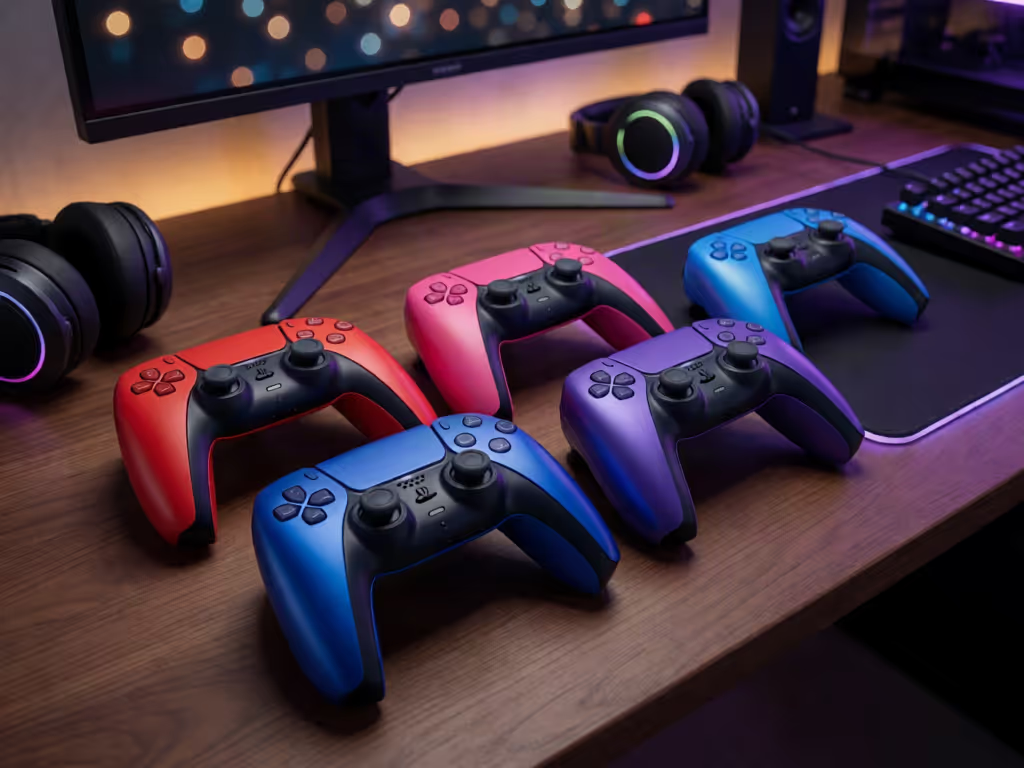
At a glance
The DualSense Wireless Controller – Cobalt Blue is the strongest supported choice here for buyers who want a metallic blue finish; the available product information does not show that it offers a comfort, grip, or clarity upgrade. Choose it if you already like the standard DualSense shape and the current delivered price is reasonable.
- Best overall: Cobalt Blue is the only colorway with enough product-specific evidence to rank. It supports PS5, PC, Mac, and mobile devices, but a USB cable is not included. View on Amazon
- Best for a distinct use case: It suits buyers who specifically want PlayStation’s metallic blue styling.
- What decides it: Prioritize the DualSense shape, current stock, seller, and total cost before color.
Important: The product information reviewed here includes no independent color-to-color testing of comfort, grip security, slipperiness, wear, or visual clarity.
A colored PS5 controller should be an easy purchase, not a style tax disguised as an upgrade. The DualSense Cobalt Blue is the only controller with enough solid product detail available to place on a list, but the available product information does not include color-to-color testing that would justify claiming it beats every other PS5 controller color for comfort, grip, or visual clarity. For a broader look at alternatives beyond this color-focused pick, see our best PS5 controller recommendations. My verdict first: buy Cobalt Blue if its metallic look is the one you want and its current price is sensible; do not buy it expecting the color alone to improve your hands, aim, or button reads.
The sensible way to shop this category is less exciting than a "best color" crown, but it saves money: choose the controller format you already like, then choose the finish you will be happy to use every session. I learned that early at a college LAN, when an unglamorous borrowed pad outlasted a much pricier setup and quietly delivered the better night of play.
The ranking below is deliberately narrow. There is one confirmed product, so it earns the only honest placement, not a made-up win over colors that have not been comparably tested in the available product information.
1. DualSense Wireless Controller - Cobalt Blue: Best Pick When You Want Metallic Blue Without Pretending It Changes Ergonomics
PlayStation's DualSense Wireless Controller - Cobalt Blue is a standard DualSense presentation in a metallic Cobalt Blue finish. PlayStation describes the color as inspired by hues from the depths of the planet; the matched retail description places it in the three-color metallic Deep Earth Collection alongside Volcanic Red and Sterling Silver.
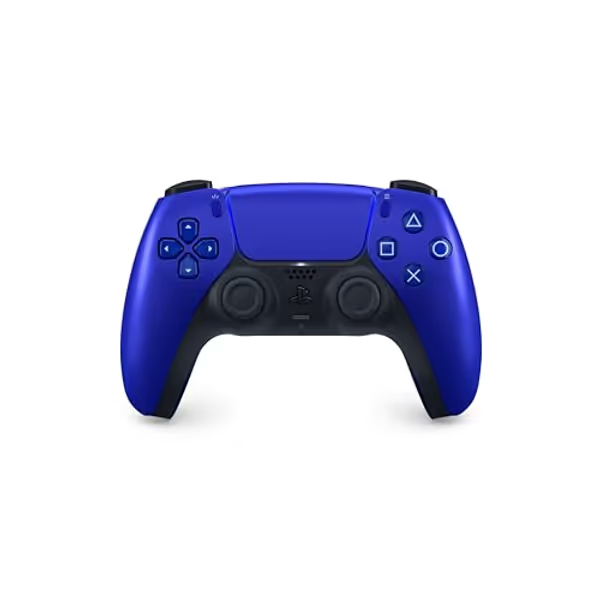
PlayStation DualSense Wireless Controller - Cobalt Blue
Next-gen immersion with haptic feedback and adaptive triggers.
ConnectivityBluetooth & USB-C
ConnectivityBluetooth & USB-C
Pros
Dynamic Haptic Feedback & Adaptive Triggers for unparalleled immersion.
Multi-device compatibility: PS5, PC, Mac, Apple TV, iOS, Android.
Integrated microphone and 3.5mm jack for seamless communication.
Cons
Battery life can be shorter with extensive haptic feedback use.
Comfort: A Familiar Shape, Not a Color-Specific Upgrade
PlayStation characterizes the DualSense design as comfortable and evolved. That is useful background if you already know you get along with the DualSense shape. It is not proof that Cobalt Blue is more comfortable than another DualSense color, or that it will fit every hand size and grip style.
That distinction matters. For a deeper look at how shape, grip, and hand position affect long-session comfort, read our ergonomic game controller guide. Comfort has two layers:
- Controller geometry: how the handles, sticks, buttons, and triggers meet your hands.
- Surface experience: how a finish feels, how it looks under your room lighting, and whether you find it distracting after hours of use.
The available information does not provide independent, Cobalt Blue-specific long-session comfort tests. It also does not establish whether the metallic finish is more or less slippery than other colors. So the practical read is simple: if a normal DualSense already works for you, Cobalt Blue gives you the same category of controller with a different visual treatment. If the DualSense shape causes fatigue for you, changing color is not a repair strategy.
Treat color as a style decision unless you have product-specific handling evidence.
Grip: Do Not Turn Marketing Finish Into a Performance Claim
"Metallic" describes the appearance PlayStation gives this version. It does not tell us, by itself, how the surface performs with dry hands, sweaty hands, or a tight competitive grip. The available product information includes no independent, Cobalt Blue-specific tests of grip texture, slipperiness, wear, or fingerprint visibility.
That makes it unsupported here to rank this controller above another color for grip. A review page that combines feedback across several DualSense colors cannot solve that problem, because comments may be about an entirely different finish.
For a buyer, the better test is your own use case:
- You already like the DualSense in hand. Cobalt Blue is a reasonable visual upgrade if the finish appeals to you.
- You need more security during high-tension matches. Do not assume a metallic colorway provides it. Look for product-specific handling evidence before spending extra.
- You are replacing a worn controller. Prioritize a seller and price that make sense over chasing an allegedly superior color.
This is where plain-language cost cuts through the noise. Paying extra solely because a blue finish might feel better is paying for a claim the available product information does not establish. Skip the tax for logos, and skip the tax for imagined performance, too.
Clarity: Metallic Visual Identity, but No Button-Legibility Edge in the Available Product Information
Cobalt Blue has a metallic Cobalt Blue exterior. If you want that look on a PlayStation game controller, the styling is the point.
But "clarity" can mean several things. In the available product information:
- Finish description: PlayStation describes the controller as metallic Cobalt Blue.
- Button-symbol clarity: not documented.
- Low-light legibility: not documented.
- Ease of locating controls during play: not compared with other colors.
So Cobalt Blue can be the color you think looks best, but the available information does not establish it as objectively clearer to operate than another color. Those are separate judgments. A visual preference is valid; it just should not be sold as a competitive advantage.
Compatibility and What You Actually Receive
The official product information lists compatibility with the PS5 console, PC, Mac, and mobile devices. If you plan to use it across several devices, our Bluetooth controller pairing and latency guide explains the compatibility and connection factors to check. That flexibility is meaningful if one controller needs to cover console sessions and other supported devices instead of becoming a single-platform purchase.
In the box, expect the controller and user manual. A USB cable is not included, so account for that if you need a cable for your intended setup. It is a small line item, but small omissions are how a "good deal" becomes a more expensive checkout.
2. The Color Comparison Buyers Want (and the Evidence That Is Missing)
The question behind most PS5 controller color options searches is usually: "Which color is better?" For comfort, grip, and operational clarity, there is no defensible answer from the available product information. If you are deciding whether a premium Sony pad is worth considering instead, compare the standard model with the DualSense Edge before treating color as the deciding factor.
Cobalt Blue is described as one of three metallic Deep Earth Collection colors, with Volcanic Red and Sterling Silver named alongside it. That establishes collection context, not a performance ladder. The product information reviewed here includes no independent side-by-side comparison of those colors on:
- long-session hand comfort;
- grip security;
- finish durability;
- fingerprint or wear visibility;
- face-button contrast;
- performance during competitive play.
The honest ranking therefore stops at Cobalt Blue as the reviewed purchase option. It would be easy to pad a list with assumptions about dark colors hiding wear, metallic finishes feeling premium, or one color being more readable. None of those claims should decide where your money goes without direct evidence.
What "Best" Should Mean Instead
Use "best" in an order that protects your budget:
- Best fit: the controller form you can use without discomfort.
- Best price: a legitimate listing at a price you are comfortable paying.
- Best appearance: the color you will still like after the newness wears off.
- Best availability: a seller that can actually deliver the standalone controller you want.
That order puts the experience ahead of branding. Spend where input matters, save where branding doesn't.
3. Value Check: When Cobalt Blue Is Worth Buying
PlayStation Direct displayed Cobalt Blue at $79 when that information was checked, and the same page showed it as unavailable at that time. That is a reference point, not a promise of current price or stock. To judge whether a higher-priced finish delivers worthwhile ownership value, use our budget-versus-premium controller cost analysis as a broader buying framework. Check the current listing before you buy; controller pricing moves, and availability is never a reason to panic-purchase.
A Good Buy Scenario
Cobalt Blue makes sense when all three statements are true:
- You want the metallic blue finish specifically.
- You already prefer or are comfortable with the DualSense layout.
- The current delivered price is acceptable to you without relying on "rare," "collectible," or urgency-based sales language.
The affiliate listing is for the standalone Cobalt Blue controller, not a dock bundle or a game-and-case package. That distinction is worth checking every time, because bundles can obscure what you are actually paying for.
A Walk-Away Scenario
Pass (or wait) when any of these applies:
- You are paying more because you expect blue to fix grip or hand-fatigue concerns.
- You are choosing it only because stock pressure makes it feel special.
- You need a USB cable immediately and have not included one in the total cost.
- Another controller you already own is working fine and the purchase is purely fear of missing out.
I do not recommend scalper-priced controllers, and I do not treat colorways as investments. A controller earns its value by surviving regular use and disappearing into the game, not by sitting on a shelf awaiting resale hype.
Deal Windows and Timing
The useful deal window is not "whenever a listing calls it limited." It is when the final price makes sense to you, using the $79 PlayStation Direct displayed price as a reference point. If the price is inflated, waiting is usually the smarter play. A metallic finish is nice; buyer's remorse has a much longer battery life.
4. Buying Checklist for a Colored DualSense
Before committing to Cobalt Blue (or any other finish) run this short checklist:
- Confirm the exact product. You want the standalone DualSense Wireless Controller in Cobalt Blue, not an accessory bundle that happens to include one.
- Price the full setup. Add any cable you need, since one is not included with this controller.
- Separate look from feel. Like the color because you like it, not because you assume metallic finishes alter grip.
- Match the controller to your devices. Cobalt Blue is listed for PS5, PC, Mac, and mobile devices; confirm that coverage fits how you play.
- Ignore artificial scarcity. Do not let a color name, reselling language, or a flashy product photo turn a normal replacement purchase into a prestige purchase.
- Keep the decision reversible. Review the current seller terms and verify the listing details before checkout, especially if the price is above the official-store reference.
This checklist is intentionally boring. Boring is good when it keeps a controller purchase from becoming a replacement headache a few months later.
Summary and Final Verdict
Rank #1: DualSense Wireless Controller - Cobalt Blue. It is the choice for players who want PlayStation's metallic blue finish and need a DualSense listed for PS5, PC, Mac, and mobile devices. PlayStation Direct displayed $79 when checked, though the controller was unavailable at that time; stock and current pricing need a fresh check. Remember to budget for a USB cable if you need one.
The key limitation is equally important: the available product information does not support crowning Cobalt Blue the best color for comfort, grip, or button clarity. It includes no color-specific independent testing of those qualities. PlayStation's description supports the metallic look and its own comfortable-design positioning, not a measurable handling advantage over other colors.
Final verdict: choose Cobalt Blue if it is the finish you genuinely want at a rational current price. Do not pay a premium for claims that the color will make you play better. The best value is the controller you stop thinking about once the match starts.
Related Articles