Best Wired Controller for PC and Xbox for Lag-Free Play
By Maya Petrovic • 28th Nov
At a glance
The GameSir T7 is the strongest overall choice here for players who want Hall Effect sticks and triggers plus configurable profiles and zones. Choose the PowerA Wired Controller instead for a simpler Xbox-focused setup with a detachable 10-foot cable, headset jack, and calibration tools.
- Best overall: Pick the GameSir T7 when customization, three profiles, firmware updates, and adjustable stick or trigger behavior matter most. View on Amazon
- Best alternative: Pick the PowerA when detachable-cable convenience and a familiar Xbox layout matter more than extensive configuration.
- What decides it: Both support PC and Xbox and include roughly 3 m cables, but neither has controlled latency testing. Wired does not prove either controller is truly lag-free.
Important: Feature claims for the GameSir come largely from retailer materials and a reproduced manual, while some PowerA specifications come from an independent review; durability, pricing, and comparable latency remain unverified.
If you're looking for the best wired controller for PC play or a dependable Xbox One wired controller, start by separating the feeling you want from the promise no product page can honestly make: the PowerA is described in an independent review as wired without battery maintenance, while the GameSir materials describe its supplied cable and connection procedure. Neither point by itself proves "lag-free" performance. What these controllers can do is remove pairing and charging from your pre-game routine, then let you focus on the controller's layout, cable reach, stick behavior, trigger control, and setup options explained in our wired vs. wireless Xbox controller guide.
For this guide, the realistic choices are the GameSir T7 Wired Controller and the PowerA Wired Controller for Xbox Series X|S. Neither has controlled, comparable latency testing behind it, so I would not crown either one the universal fastest. Instead, I'll show you which controller better fits the way you play, and how to set it up so your inputs remain repeatable when a close round gets tense.
Simplify the inputs, and you'll amplify consistent outcomes.
The short answer: which controller should you choose?
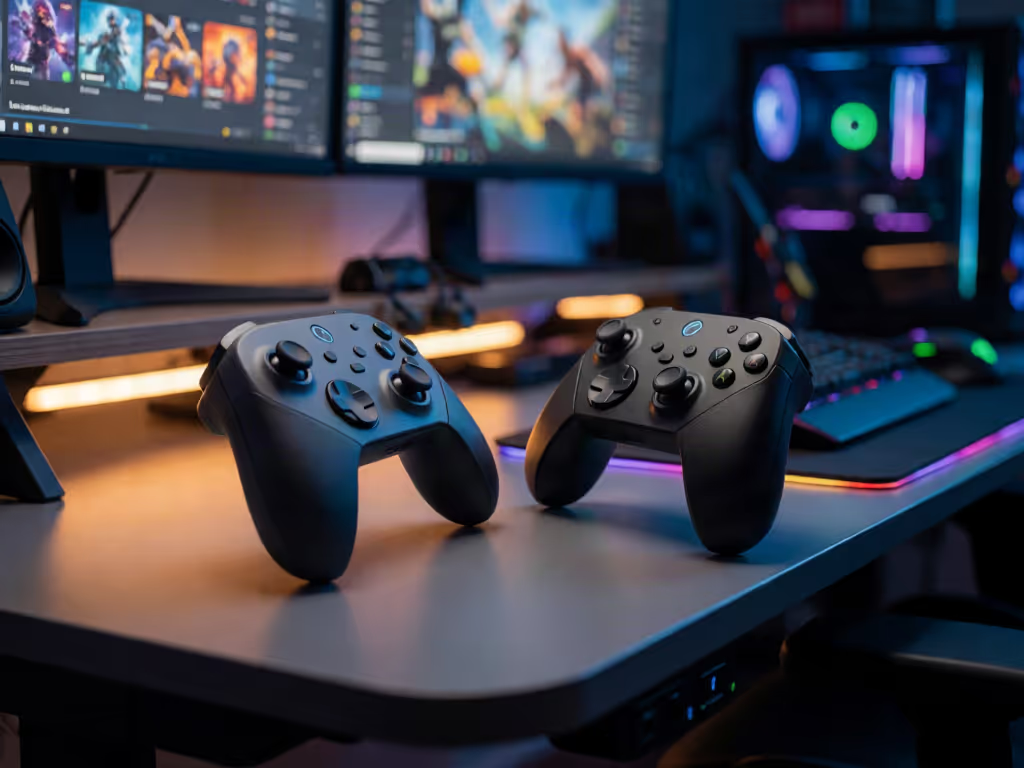
Choose the GameSir T7 if your priority is configurable controls and Hall Effect sticks and triggers, as part of a broader PC controller setup. It supports Xbox Series X|S, Xbox One, Windows 10/11, and Steam. You can use GameSir Nexus for button mapping, stick and trigger zones, vibration, firmware updates, and three custom profiles.
Choose the PowerA Wired Controller for Xbox Series X|S if you want a straightforward Xbox-shaped controller with a detachable 10-foot USB-C cable, a 3.5 mm headset jack, and support for Xbox Series X|S, Xbox One, and Windows 10/11 PCs. PowerA Gamer HQ also lets you handle calibration and diagnostics.
Both make sense as a wired gaming controller for PC and Xbox. The better pick comes down to this:
- You want tuning options and Hall Effect components: GameSir T7.
- You want a detachable cable and simple, familiar setup: PowerA.
- You play from a couch or a PC set back from your display: both include 3 m / 10 ft cables, so route the cable safely rather than stretching it tight.
- You want paddles, trigger locks, or rear-button mapping: neither base controller is the clear fit from the available specifications. Don't accidentally assume features from similarly named upgraded models carry over.
What "lag-free" should mean when you buy wired
For these two controllers, the available materials describe their cables and connection procedures. They do not establish a measurable latency advantage over another pad.
So assess a wired controller through the things you can act on:
- Connection reliability: Does the cable reach your PC or console without tension, sharp bends, or a walk path that invites an accidental yank?
- Input repeatability: Can you press the trigger to the same depth, return the stick to neutral, and hit face buttons without changing your grip?
- Software access: Can you calibrate, check behavior, and adjust zones when something feels off?
- Audio convenience: If you use a wired headset, a controller-mounted 3.5 mm jack keeps your setup simple.
- Comfort over a real session: The best layout is the one you can hold naturally through several matches, not the one that looks most advanced in a product photo.
This is also why I don't recommend buying an alleged pro Xbox controller purely because it advertises more features. A complicated layout that disrupts your thumb position can cost you more missed movement, aim corrections, and reloads than it returns. Train what you intend to execute.
GameSir T7 Wired Controller: best for players who want to tune the baseline
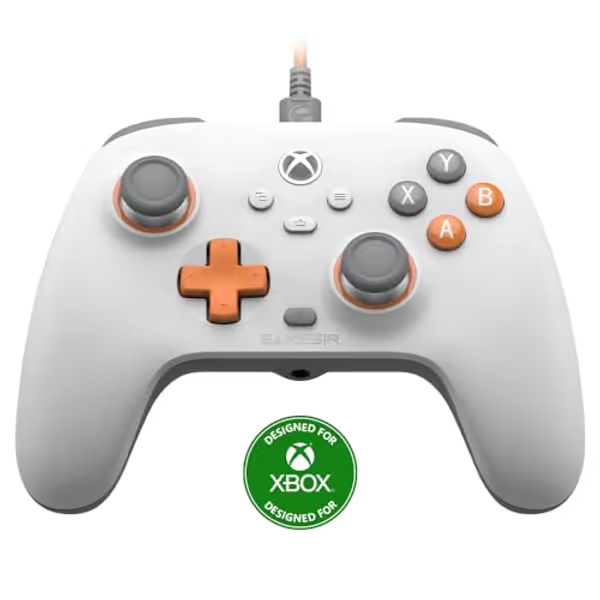
The GameSir T7 is the more compelling option when controller maintenance and configurable response are central to your buying decision. It uses Hall Effect joysticks and Hall Effect analog triggers. That is a meaningful feature to consider if you are tired of thinking about stick-sensor wear, but it is not proof that this controller will never develop drift or last forever.
GameSir T7 Wired Controller
Drift-free wired controller for Xbox & PC with Hall Effect tech.
0
Joystick TypeHall Effect (Anti-drift)
Joystick TypeHall Effect (Anti-drift)
Pros
Eliminates stick drift with Hall Effect joysticks.
Responsive Hall Effect triggers for precise control.
Immersive haptic feedback from four rumble motors.
Comfortable, textured ergonomic design for long sessions.
Cons
Wired connection only (no wireless freedom).
Platforms and desk-to-couch setup
The T7 works with Xbox Series X|S, Xbox One, Windows 10/11, and Steam. The 3 m Type-C cable lets you connect and play. Connect the cable to your device, then briefly press the Home button to power the controller on. For a desktop setup, that cable length is useful only when it is managed well:
- Plug into a USB port you can reach without pulling the controller cable across your chair wheels.
- Leave a little slack at both ends; a taut cable turns a small body movement into a connection problem.
- Keep the cable away from foot traffic, or use a simple cable route along the desk edge.
That sounds basic, but it fixes a real competitive-game irritation: the controller that feels inconsistent only because the connector is being moved at the worst possible time.
Why the configuration matters
With GameSir Nexus on Xbox or PC, you can handle firmware updates and create three custom profiles. You also get button mapping, stick and trigger zone settings, and vibration control. These aren't settings to max out for the sake of it. They are tools to make your inputs predictable.
Here is how I would approach them:
- Start with one profile. Use it for your main genre for a few sessions before touching a second profile.
- Adjust one setting at a time. If you alter stick zones, triggers, and button mapping together, you won't know what actually improved, or harmed, your control.
- Calibrate only when you have a reason. If you calibrate sticks and triggers, unplug and reconnect afterward.
- Protect core actions. Map only actions you already use enough to remember. You do not need a clever remap that fails under pressure.
In a racing game, smooth analog trigger travel may matter most for controlling acceleration and braking. In a shooter, your first job is to maintain movement and aim without unplanned grip changes. In an action game, a profile can reduce menu friction if you use a repeatable button arrangement across titles.
The T7 also includes a 3.5 mm audio jack. With a headset connected, you get master volume, game/chat balance, and microphone mute controls. Confirm the behavior with your own headset and platform before a team session, rather than troubleshooting audio while your squad waits.
Vibration and feel
The T7 has four rumble motors, including motors in the grips and triggers. That could appeal if you want more feedback during driving, combat, or impact-heavy games. For competitive play, test it deliberately. If vibration makes fine aim corrections noisier for you, use the available vibration control to find a lower-distraction setting rather than treating maximum feedback as mandatory.
PowerA Wired Controller for Xbox Series X|S: best for a direct, uncomplicated Xbox layout
The PowerA Wired Controller for Xbox Series X|S is a cleaner recommendation for the player who wants a conventional wired Xbox pad and does not need extensive profile management. It works with Xbox Series X|S, Xbox One, and Windows 10/11 PCs.
Its detachable USB-C cable is 10 feet (3 m), matching the practical reach many living-room and desk setups need. Detachability is particularly helpful for storage and transport: you can pack the controller without forcing the cable to bend around it, then reconnect before your next session.
What you get for everyday play
According to product materials, the PowerA includes:
- A 3.5 mm stereo headset jack
- Dual rumble motors
- Impulse Triggers, with localized trigger vibration in supported titles
- Support for the PowerA Gamer HQ app for calibration and diagnostics
The grip is comfortable during longer sessions for many players. Your hands may disagree, and that is normal. Hand size, grip pressure, and game genre all change the equation, so our guide to ergonomic game controllers is useful if comfort is a deciding factor. If possible, use a return policy responsibly to give the shape a genuine at-home test: a couple of familiar sessions, not five minutes in a menu.
The PowerA is a strong fit for a player who says, "I want an xbox wired gamepad that connects, reaches the couch, takes my headset, and stays out of the way." That simplicity has value. A player I coached early on had plenty of talent but kept coming up just short of the next promotion. We stopped chasing novelty, rebuilt the essential inputs around fewer decisions, and drilled the pattern until it held under pressure. His duel results improved week over week. The device did not make the decision for him; the reliable routine did.
What not to assume
Be precise with the model. The base PowerA Wired Controller should not be treated as if it includes rear mappable buttons or adjustable trigger stops from other PowerA lines. If those are non-negotiable for your playstyle, check the exact model specification before you buy.
An independent review reports a two-year limited warranty for the PowerA Wired Controller for Xbox Series X|S, but terms can vary by market and seller. Verify the current terms from the retailer or warranty provider at checkout.
Side-by-side: GameSir T7 vs. PowerA Wired Controller
| Buying factor | GameSir T7 Wired Controller | PowerA Wired Controller for Xbox Series X|S | |--|--|--| | Platform support | Xbox Series X|S, Xbox One, Windows 10/11, Steam | Xbox Series X|S, Xbox One, Windows 10/11 PC | | Cable | 3 m Type-C cable | Detachable 10 ft / 3 m USB-C cable | | Stick and trigger details | Hall Effect joysticks and Hall Effect analog triggers | No Hall Effect specification | | Software | GameSir Nexus: profiles, mapping, zones, vibration, firmware | Gamer HQ app: calibration and diagnostics | | Headset connection | 3.5 mm audio jack | 3.5 mm stereo headset jack | | Rumble | Four rumble motors | Dual rumble motors and Impulse Triggers | | Best match | Players who want configuration and Hall Effect components | Players who want detachable-cable simplicity and a familiar Xbox-focused option |
Neither row is a measured input lag comparison. Buy based on features you will actually configure or use, not an unverified promise that one will make every game feel instant.
A five-minute controller routine before competitive play
The controller is only part of the result. Your pre-match routine stops small setup problems from becoming "my inputs felt weird" after a loss.
1. Check the physical connection
Connect the controller before opening the game. Confirm the cable is fully seated and has slack. If you use a headset through the controller, check your audio and microphone before joining voice chat.
2. Confirm your practiced settings or defaults
With the T7, use the settings you have already practiced with. With either controller, avoid changing sensitivity, trigger zones, and button arrangements immediately before a ranked session. The point is not to be precious about settings; it is to keep your motor pattern stable.
3. Run an input drill
In a training range, menu, or low-stakes match:
- Move the left stick through its full range, then release it.
- Make four slow aim sweeps with the right stick.
- Press each trigger from light pull to full pull.
- Tap your key face-button sequence: reload, jump, melee, ability, or dodge.
If something is wrong, address it before competition. If nothing is wrong, stop tinkering.
4. Review your grip after the first round
Ask one useful question: Did I move my thumb off the stick for an action I perform constantly? If yes, do not rush into a complicated remap. First decide whether that action is truly frequent enough to justify a layout change, then practice it outside ranked play.
Final verdict
The GameSir T7 Wired Controller is my pick for the player who wants the most control over the controller's behavior from these two options. The Hall Effect sticks and triggers, 3 m cable, headset jack, and GameSir Nexus options make it the better fit when you want to establish a few purposeful profiles and refine stick or trigger zones over time.
The PowerA Wired Controller for Xbox Series X|S is the better fit if you value a detachable 10-foot cable, Xbox and Windows PC coverage, headset support, and a more straightforward routine. It is an especially sensible choice when you want a second controller or a direct replacement without turning setup into a project.
Neither controller can be verified as categorically lag-free or universally the best. But either can become a dependable part of your setup if you choose for your platform, cable route, and game habits, then stick with the layout long enough for it to become automatic. Consistency beats the occasional brilliant round. Choose the controller that supports your repeatable actions, set it up carefully, and train what you intend to execute.
Related Articles